claude-agent-lab
Command Center, a Claude Agent SDK learning lab




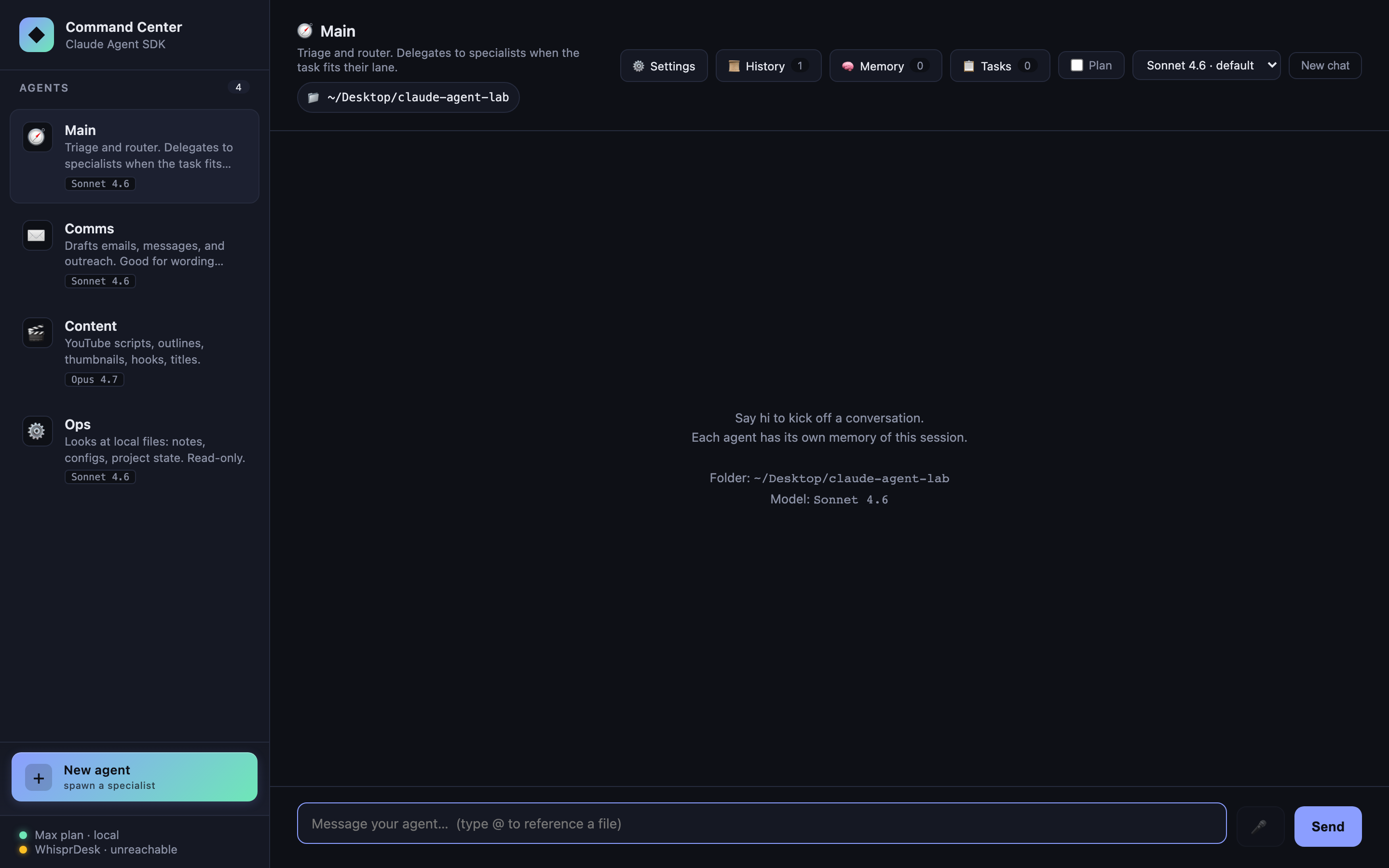
A small, hackable multi-agent dashboard built directly on Anthropic’s official Claude Agent SDK. Four built-in specialists plus unlimited custom agents you spawn from the sidebar, each with its own system prompt, tool allowlist, and model. A router that delegates to specialists. Durable SQLite-backed task queue with atomic checkout, lease-based crash recovery, and Haiku auto-routing. Per-agent budget caps (cost + rate) enforced before every SDK call. Token-by-token streaming. Folder scoping. @file and /command autocomplete. Persistent SQLite memory. Conversation history with restore-and-resume. OAuth-aware cost & token tracking. Markdown / JSON conversation export. Settings UI for integrations. Voice I/O via WhisprDesk.
All in ~7,500 lines of hand-written code — because most of the work is already inside the SDK.
This is an educational reference, not a product. It is designed to be studied, forked, and modified locally. You supply your own Anthropic credentials. There is no hosted version and none is planned. See the Authentication section for the ToS caveat on claude.ai OAuth and third-party products.
Why this exists
A YouTuber demonstrated a “command center” agent dashboard built on an open-source multi-provider agent CLI, and casually mentioned it took ~6–7 weeks. I wanted to see how much of that is the engine work that the official Claude Agent SDK now hands you for free, and how much is the actual product work that still stands on its own.
The answer: when Claude is the target model, the SDK collapses the engine layer to a function call. Command Center exists as a concrete, readable example of how thin that layer can be — and a sandbox to explore what the SDK makes easy that used to be hard.
If you need multi-provider (OpenAI / Ollama / OpenRouter / local), this isn’t the right starting point — check out Clawless, a polished desktop app I’m building with full multi-provider support (Anthropic, OpenAI, Gemini, Ollama, and more). Same author as this lab. Public launch in ~2 weeks — visit clawless.ai for early-access updates.
Features at a glance
Each feature maps to one or two options on the SDK’s query() call. Reading the source is reading the SDK’s surface area.
| Feature | SDK primitive |
|---|---|
| Multi-agent sidebar | systemPrompt, allowedTools per call |
| Custom agents (CRUD) | SQLite-backed registry merged with built-ins at runtime |
| Sub-agent delegation | agents: Record<string, AgentDefinition> + Agent tool |
| Token-by-token streaming | includePartialMessages: true → stream_event messages |
| Folder scoping | cwd |
| Per-agent model selection | model: "claude-opus-4-7" \| "claude-sonnet-4-6" \| "claude-haiku-4-5" |
| Task queue with auto-routing | One-shot Haiku query() as a classifier |
| Durable task queue (SQLite + atomic checkout) | Tasks survive restart; lease-based crash recovery; concurrent-safe checkout |
| Budget caps (CostGuard) | Preflight check() before every query(); cost cap + rate cap; OAuth-aware |
| Markdown rendering | Not SDK — marked + DOMPurify + highlight.js on completed replies |
| Persistent memory (SQLite) | Injected into systemPrompt on every call |
| Session history + restore | Every conversation persisted to SQLite; click to resume any past session |
| Cost & token tracking | Per-message + per-session totals, OAuth-aware (no fake $ for Max users) |
| Conversation export | /export slash command — Markdown or JSON download |
| Settings panel | DB-backed config with env-var fallback |
| Slash commands + autocomplete | Client-side interception + live popover |
| Plan mode toggle | permissionMode: 'plan' |
| Voice in/out via WhisprDesk | Not SDK — proxy to local WhisprDesk gateway + browser SpeechSynthesis |
| Abort on client disconnect | abortController: AbortController |
| Multi-turn per agent | resume: sessionId captured from system.init |
@file autocomplete |
Not SDK — plain filesystem read + UI glue |
Multi-agent sidebar
Four built-in specialists, each defined by a ~20-line object in src/agents.ts: systemPrompt, allowedTools, model, and UI metadata (emoji, accent). Click one → chat. Each agent keeps its own conversation with its own session ID.
- 🧭 Main — triage + router, no direct tools
- ✉️ Comms — drafts messages,
WebFetch - 🎬 Content — YouTube / long-form writing,
WebSearch+WebFetch, Opus 4.7 - ⚙️ Ops — reads local files in the selected folder,
Read/Glob/Grep, read-only
The bottom of the sidebar has a prominent gradient + New agent button — spawning specialists is a first-class operation, not a hidden escape hatch.
Custom agents (CRUD)
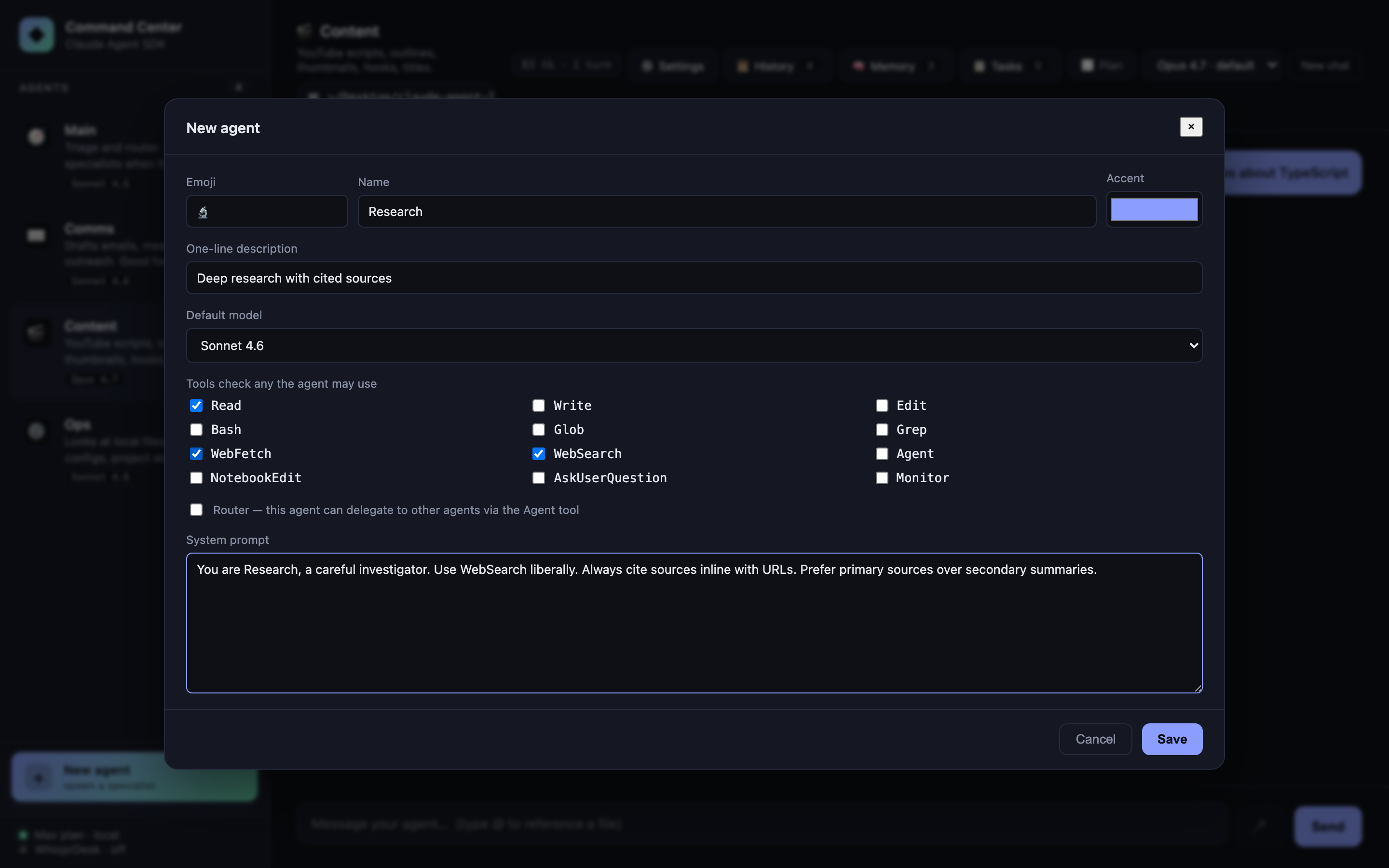
Click + New agent to open a full editor: name, emoji, accent color, one-line description, default model, tool checkboxes (all 12 SDK-known tools), router flag, and system prompt. Saves to SQLite (data/lab.db) and merges with the built-ins at runtime via a unified agent registry.
- Edit any custom agent via the ✎ that appears on hover in the sidebar
- Delete via the same editor (built-ins are read-only — they return 400 on PATCH/DELETE)
- Custom agents participate in everything: streaming, sessions, memory injection, folder scoping, plan mode, sub-agent delegation. If you flag one as a router, Main’s delegation list grows to include it
- Agent id is slug-generated from the name; collision-resolved automatically
Your Main/Comms/Content/Ops defaults stay in TypeScript (you can edit them there). Anything you spawn from the UI goes in SQLite. Best of both: version-controlled baseline + user-editable extras.
Sub-agent delegation
Promote an agent to a “router” by giving it Agent in its allowedTools and populating options.agents with AgentDefinition objects for the specialists. It gains the ability to invoke any named sub-agent as a tool.
Ask Main “draft a short email thanking a client” → Main recognizes this as Comms’s lane → invokes Comms as a sub-agent → the reply threads back with a “🤝 delegated to ✉️ Comms” chip.
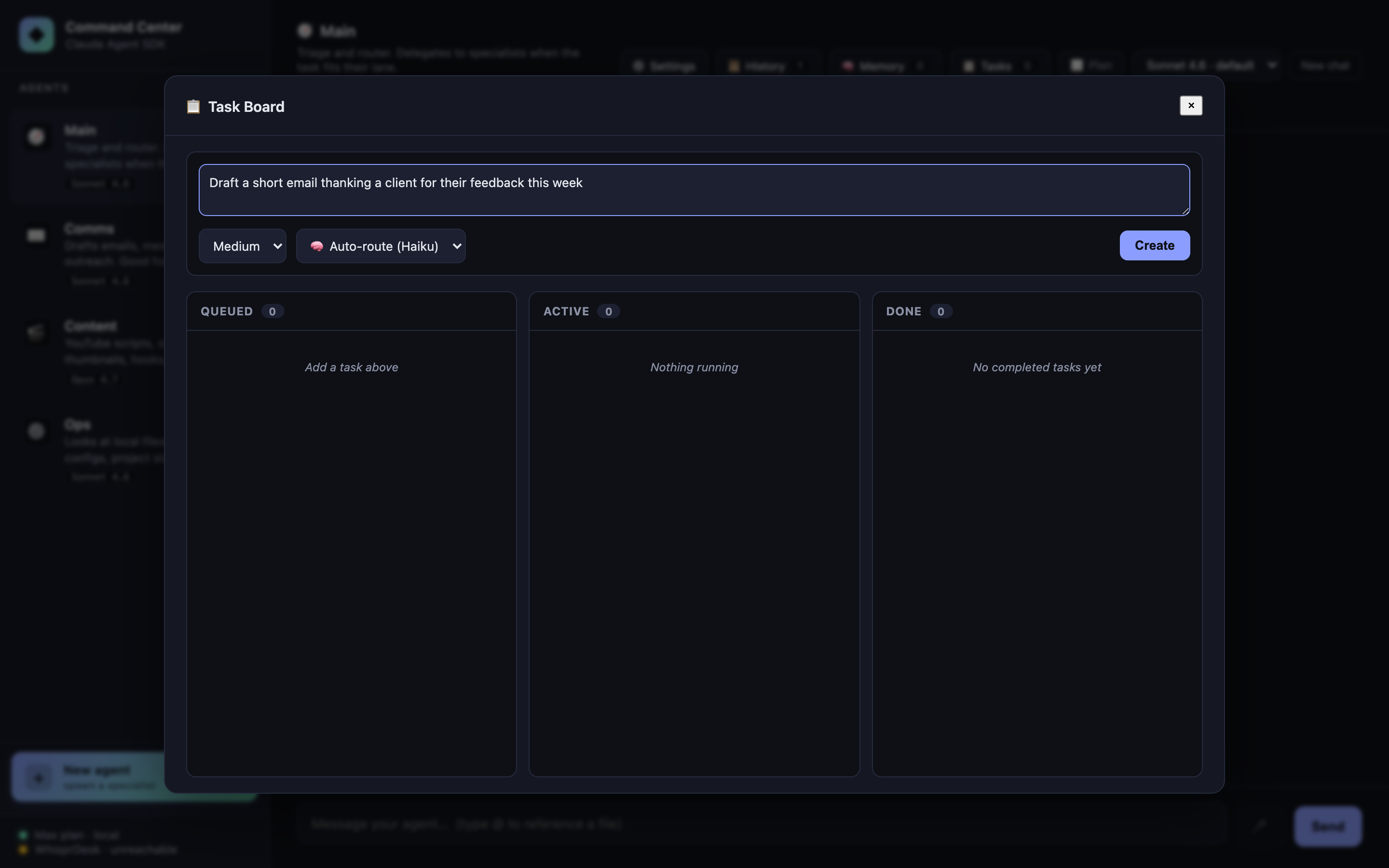
The whole routing decision is handled by the model. There is zero manual “which agent should this go to?” code in the server — just the agents option and an Agent entry in allowedTools.
Token-by-token streaming
POST /api/chat/stream returns NDJSON (one JSON object per line). With includePartialMessages: true, the SDK emits stream_event messages whose event.delta.text carries the incremental text. The server forwards them to the frontend, which appends to a live-updating chat bubble with a blinking cursor.
Why NDJSON instead of Server-Sent Events? EventSource can’t POST, and we want the client to start the connection with a request body. NDJSON over fetch().body.getReader() is simpler, works anywhere, and doesn’t need the browser’s SSE state machine.
Folder scoping
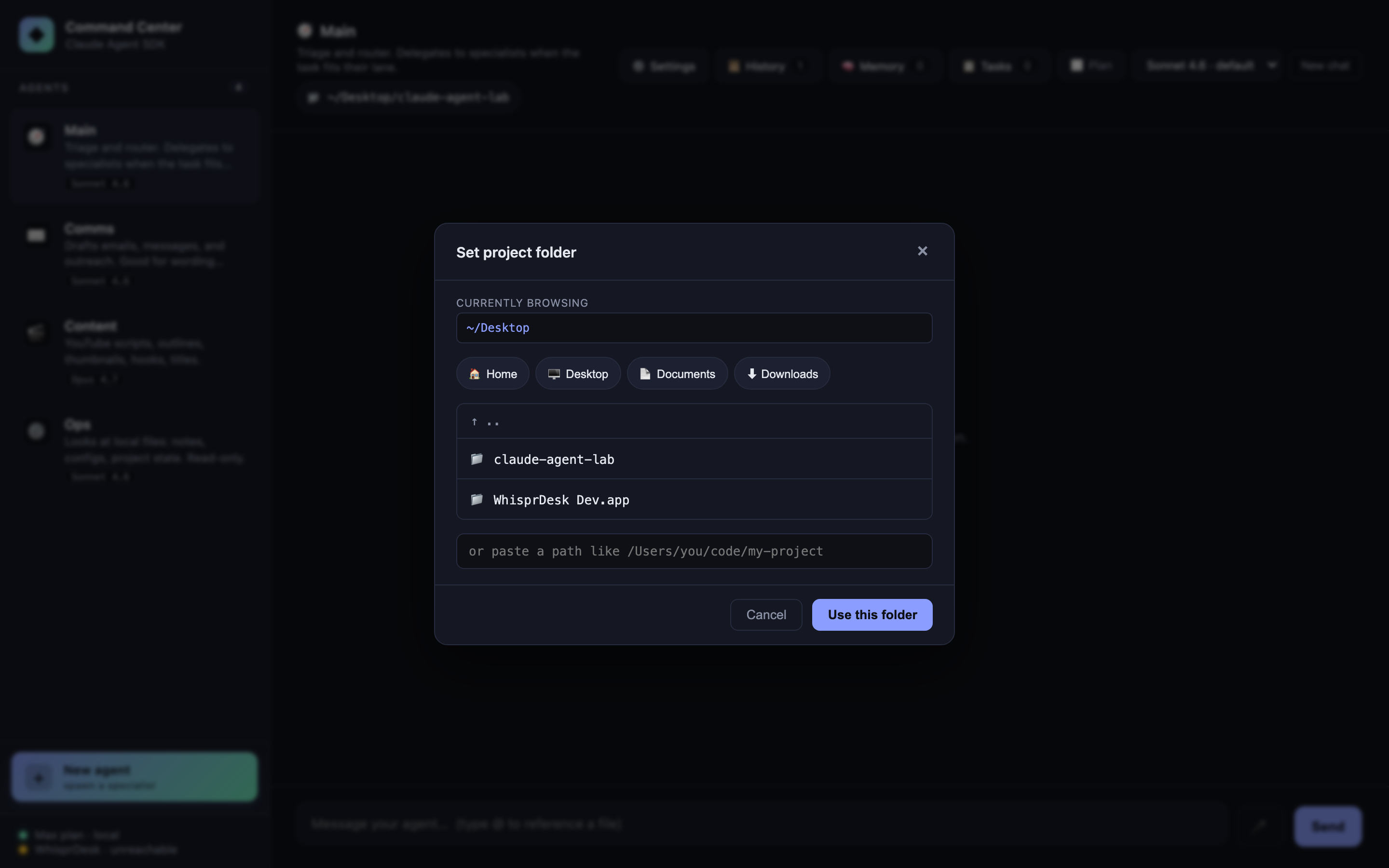
One SDK option — cwd — and every agent runs scoped to the folder you pick. Ops’s Read/Glob/Grep tools operate inside that folder. The classifier and other agents get folder context in their turn history.
Click the 📁 pill in the chat header to open the picker. Browse, drill down, or paste a path. Quick-preset buttons for Home / Desktop / Documents / Downloads. Changing folder clears all sessions (the old cwd would stale any resumed conversation).
Per-agent model selection
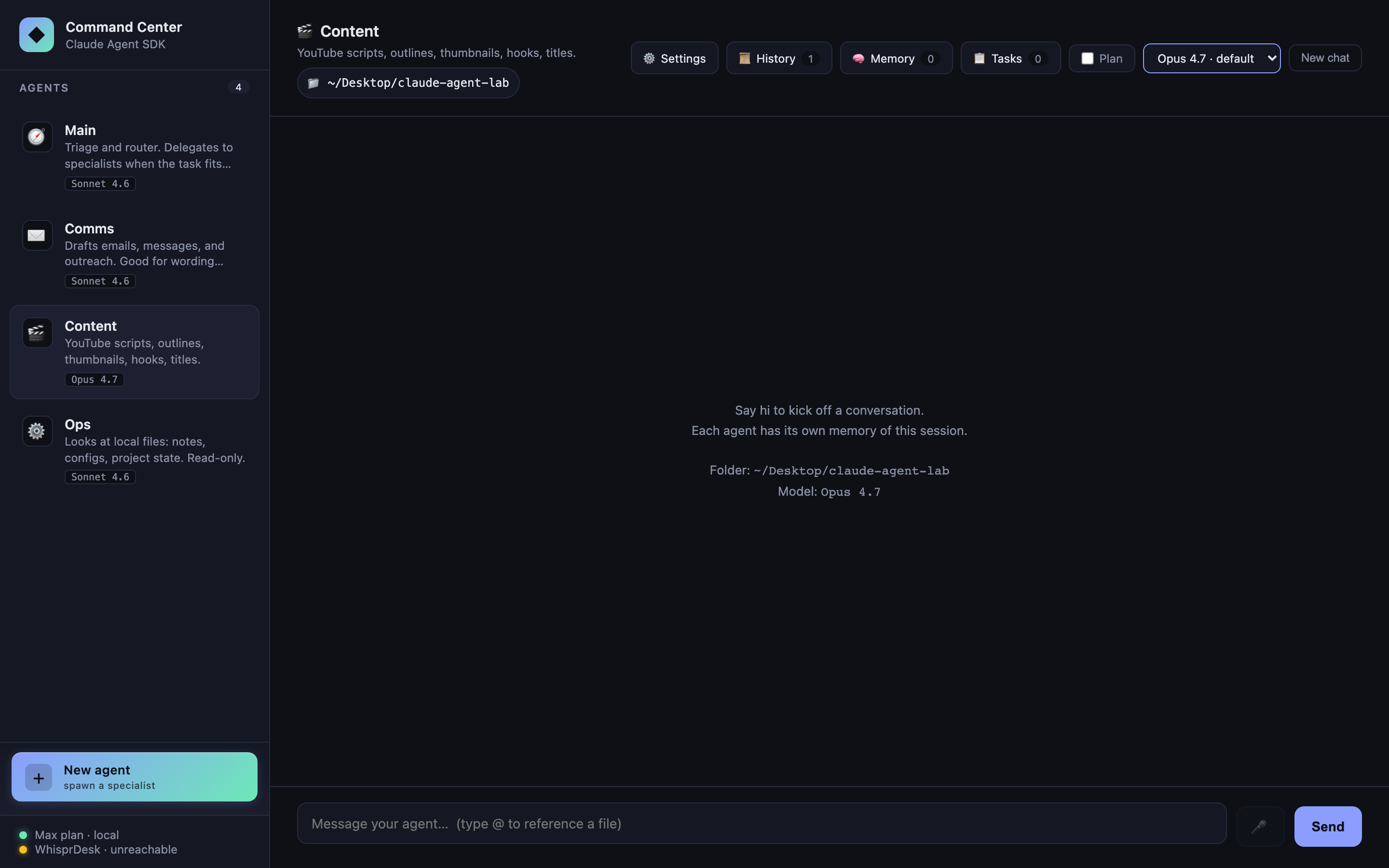
Each agent has a default model in agents.ts. The header <select> overrides it per-agent at runtime. The reply’s footer shows exactly which model answered (🧠 Sonnet 4.6) and how it authenticated (🔐 Max plan · subscription for OAuth, or 🔑 API key (...) for a key).
Switching models clears that agent’s session — the new model starts with a fresh context, not a context primed for the old one.
Task queue with auto-routing
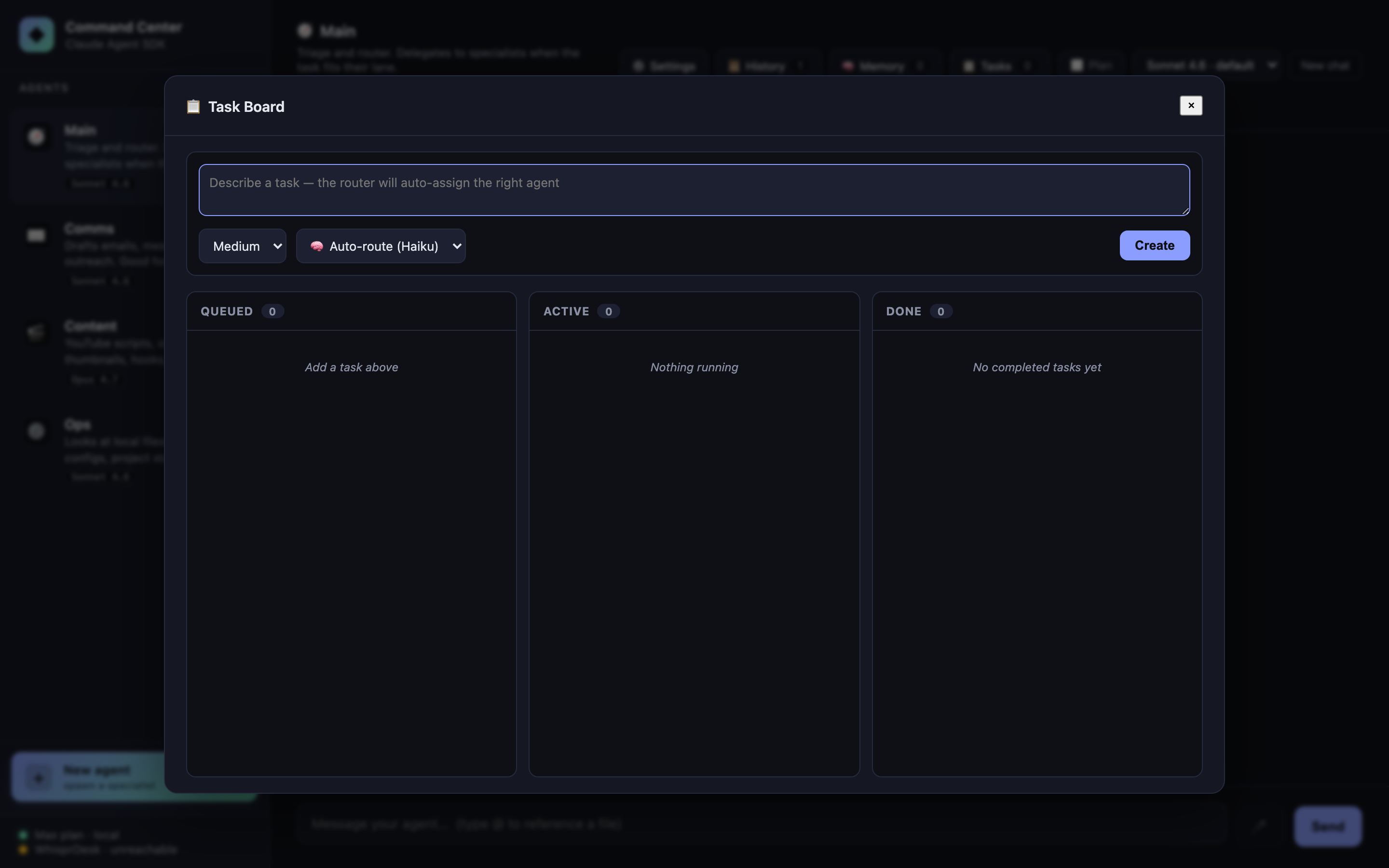
Click Tasks in the header. Describe a task, set priority, hit Create. A one-shot Haiku query (~1s, ~$0.0001) classifies the task to the best agent. The task lands in Queued; click Run to fire it. Tasks run with a fresh context (no session resume) so they don’t pollute an ongoing chat.
Auto-routing accepts an optional agentId override if you’d rather pick the specialist yourself.
Why Haiku for classification? It’s fast, cheap, and the task is well-bounded. The main-thread agents use Sonnet or Opus; Haiku handles the decisions about where to send the work.
Durable task queue
Tasks live in SQLite (data/lab.db → tasks table), not in an in-memory Map. Restart the server mid-run and every task — queued, checked-out, done — comes back exactly as you left it. The queue’s primitive lives in src/taskQueue.ts as a host-agnostic module (zero Express / SDK imports) so it lifts cleanly into any Node project.
What “durable” actually buys you here:
- Atomic checkout via
BEGIN IMMEDIATE+RETURNING *. Two workers can race for the same task and exactly one wins; the loser gets back a 409-shaped “already checked out.” No double-runs. - Lease-based crash recovery. Each checkout claims a lease (default 5 min). If the worker crashes — process killed, OS reboot, anything — the lease expires and
reapExpired()returns the task toqueuedfor retry, up tomaxAttempts. - 5-state machine.
queued → checked_out → done | failed | cancelled, with lease-expired loopback toqueued. Therunningstate from the C03 in-memory version was dropped — it was a worker-side concern, not a queue-side one. - Worker fingerprint baked in. Each row records the
worker_id({hostname}:{pid}:{uuid}) of whoever checked it out, for forensics on which process did what.
// The queue API (src/taskQueue.ts) — same primitive that backs the kanban UI
const id = queue.enqueue({ description, agentId, priority, metadata });
const claim = queue.checkout({ workerId, leaseSeconds: 300 }); // atomic
queue.complete(id, { result });             // → done
queue.fail(id, { error, retryable: true }); // → queued (if attempts left) or failed
queue.cancel(id);                            // → cancelled (terminal)
queue.reapExpired();                         // sweep crashed workers
The kanban UI looks identical to the C03 version — same Queued / Active / Done columns, same priority chips, same Run button. The change is entirely in the backing store.
@file autocomplete
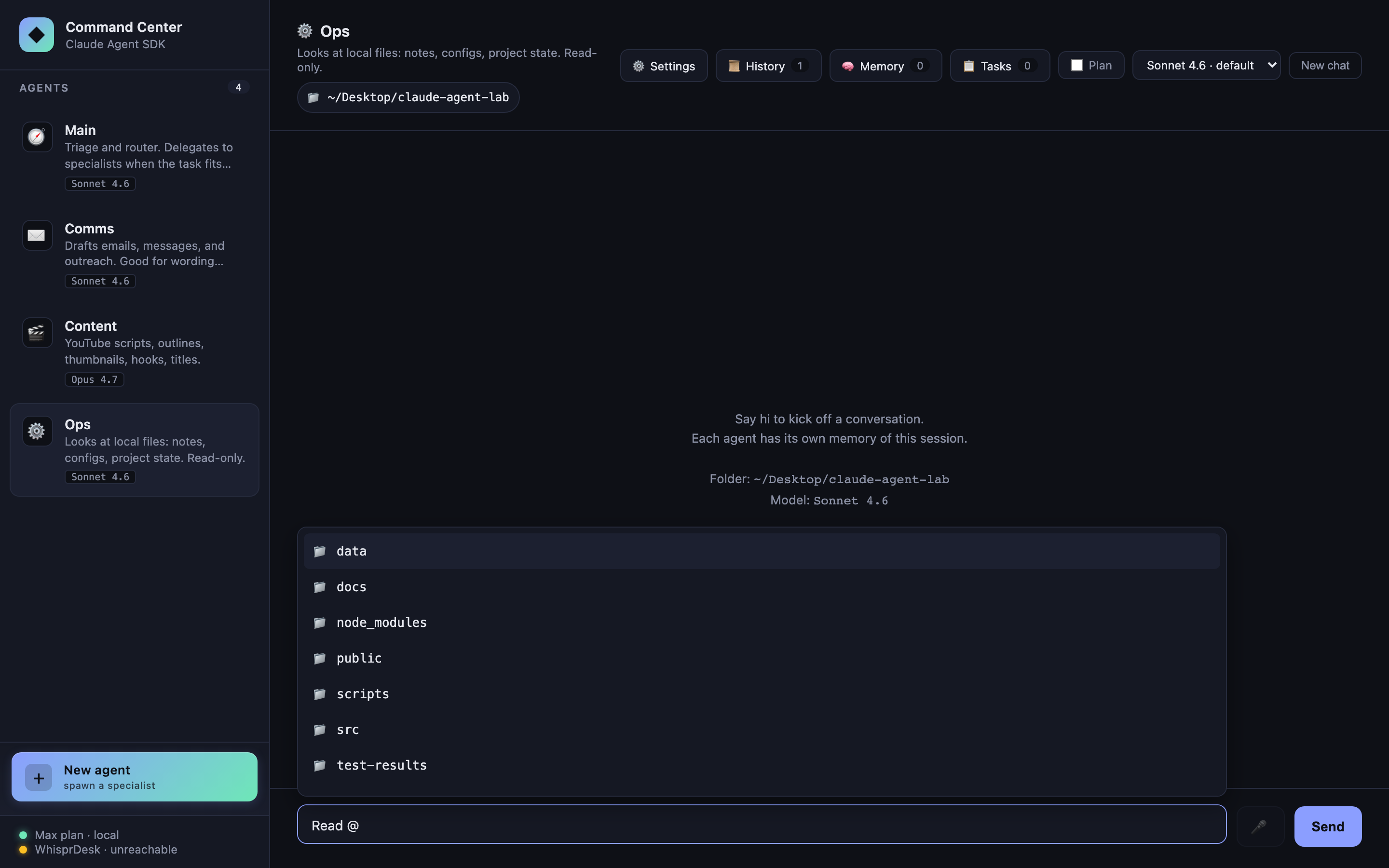
Type @ in the composer. A dropdown appears with files in the current cwd, filterable, keyboard-navigable (↑/↓, Enter, Esc). Selecting inserts `filename` into the prompt, which Ops (with Read in its allowlist) will then open.
Not an SDK feature — just fs.readdir on the server and a tiny popover in public/app.js. Included to show how naturally the SDK composes with normal web UI plumbing.
Markdown rendering
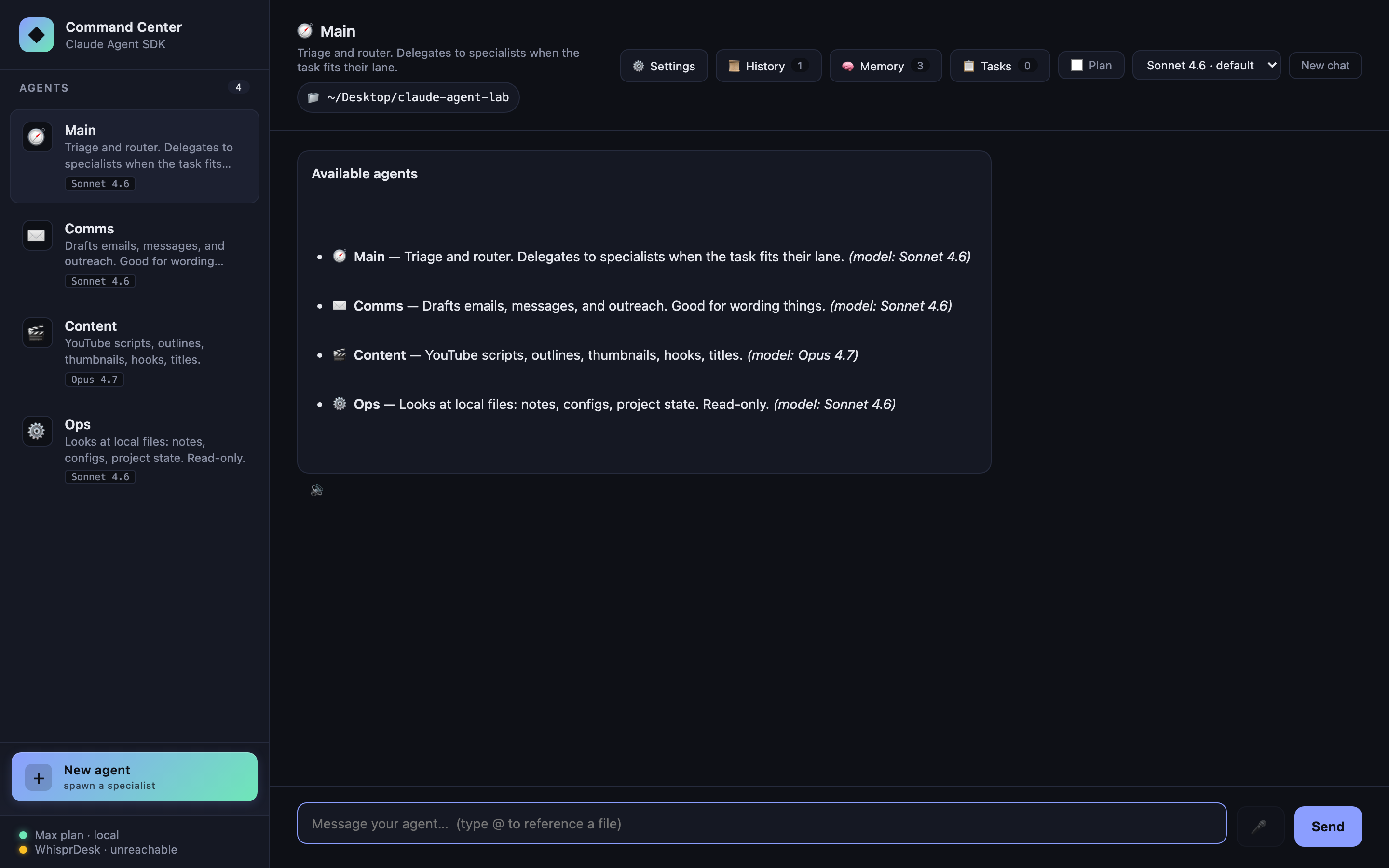
Agent replies are rendered as sanitized markdown once streaming completes — bold/italic, lists, tables, syntax-highlighted code blocks, blockquotes, links (external links open in a new tab). During live streaming the bubble stays plain text to avoid parsing markdown on every delta; on done we swap in the markdown HTML.
Three libraries, all via jsDelivr CDN so there’s no build step:
marked— parserDOMPurify— sanitizer (prevents XSS from any HTML the model emits)highlight.js— code block syntax highlighting (github-dark theme)
User messages stay plain text. System-origin messages (slash-command output, memory injections) use the same renderer for parity.
Persistent memory (SQLite)
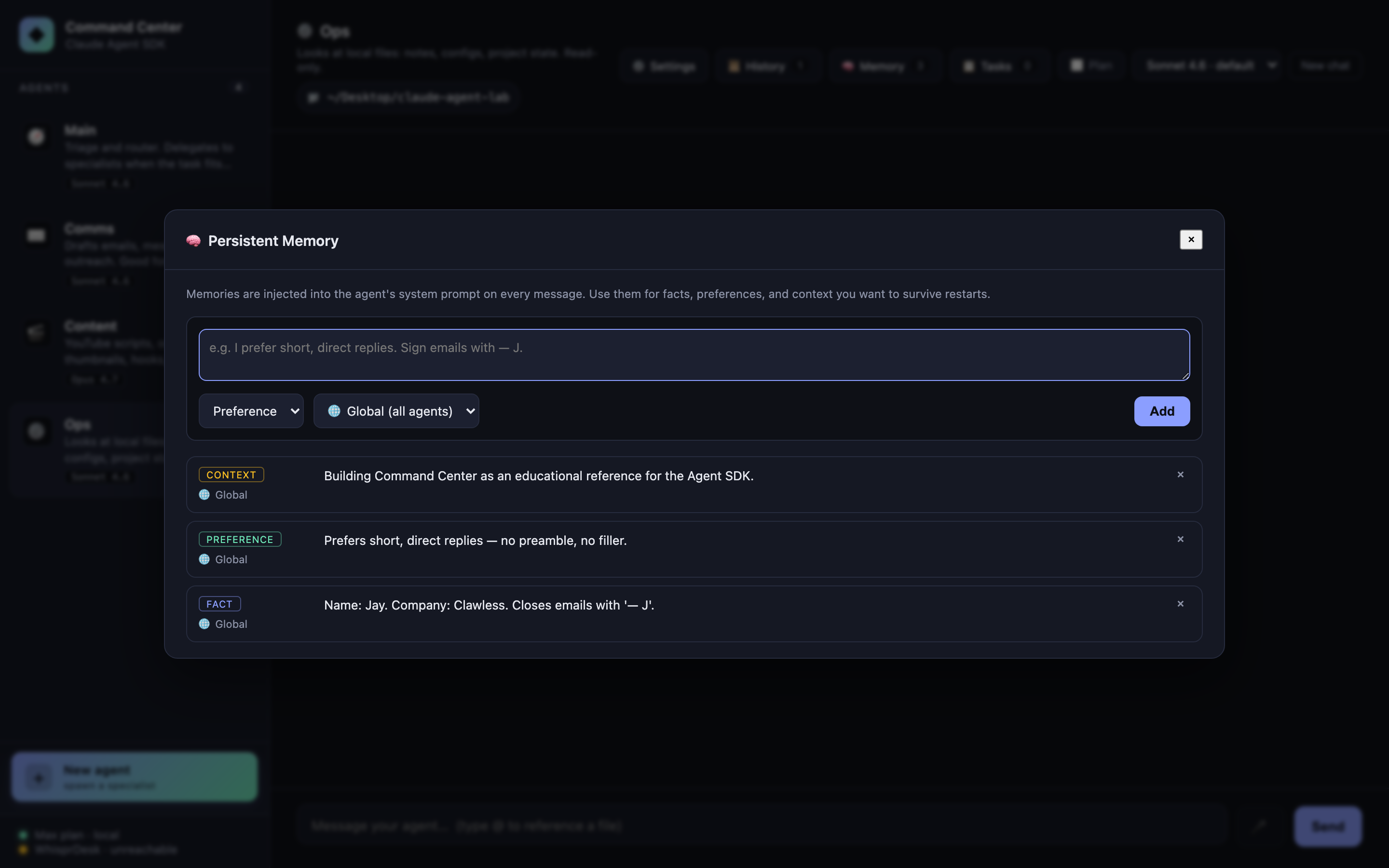
Facts, preferences, and context that should survive restarts. Stored in ./data/lab.db (gitignored) via better-sqlite3. Memories can be:
- Global (all agents) or scoped to one agent
- Categorized as
fact,preference, orcontext - Added from the Memory panel (header button) or via API
On every query() call the server pulls memories relevant to the active agent and appends them to the system prompt as a <persistent-memory> block, capped at ~2,000 characters to stay in budget. Specialist and router agents both see them.
<persistent-memory>
Preferences:
- Prefers short, direct replies — no preamble, no filler.
Facts:
- Name: Jay. Company: Clawless. Closes emails with '— J'.
Context:
- Building Command Center as an educational reference for the Agent SDK.
</persistent-memory>
Session history + restore
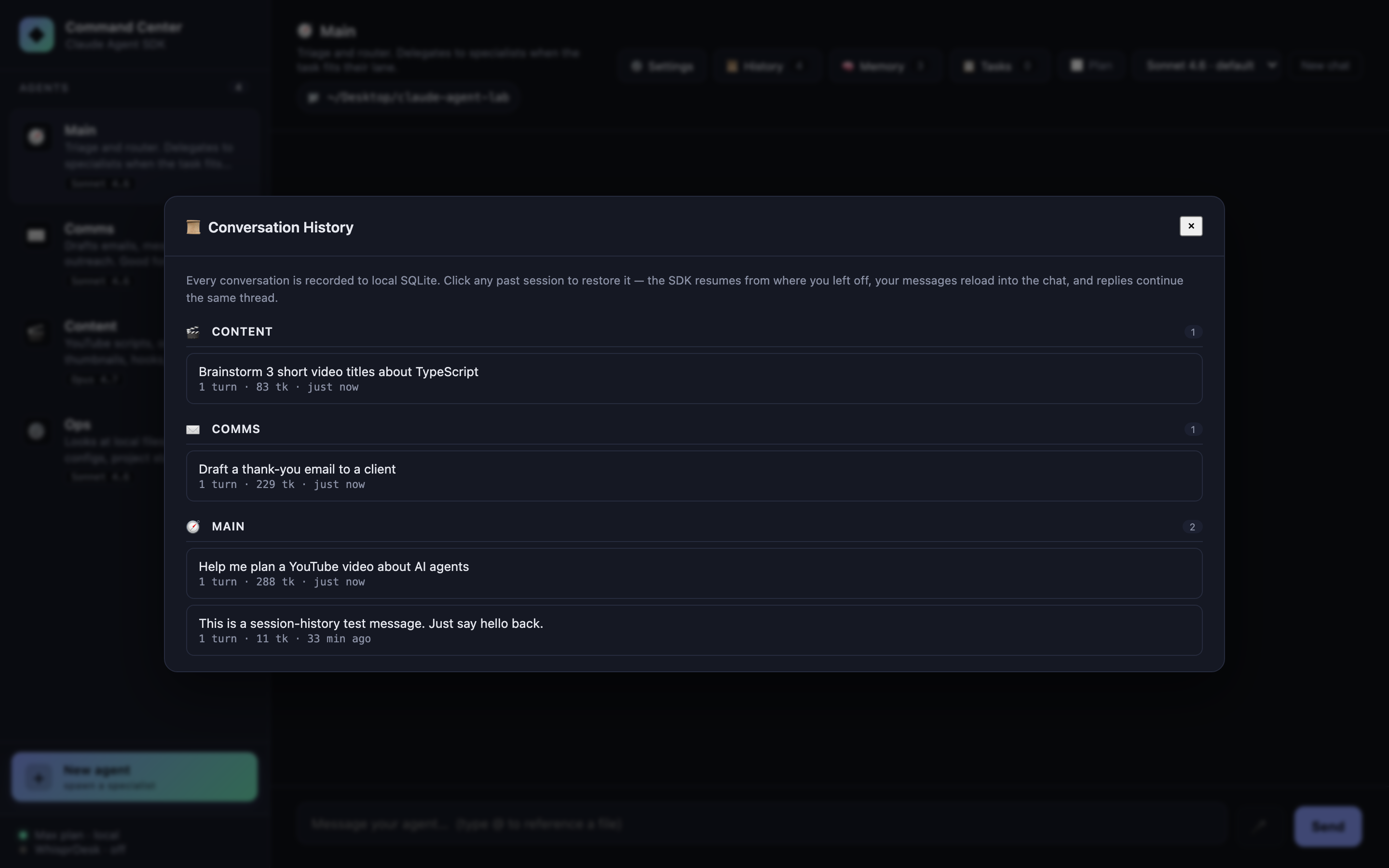
Every conversation is recorded to local SQLite as it happens — sessions and session_messages tables with full usage objects, model info, and tool-use traces. The 📜 History button in the chat header opens a modal listing all past sessions, grouped by agent, with auto-titles (taken from your first user message), turn counts, total tokens, and relative timestamps.
Click any session to restore it. The SDK’s resume: re-attaches to that session id, your messages reload into the chat, and your next reply continues the same thread — agent memory and all. Hover any row to rename (✎) or delete (✕).
sessions(id, agent_id, title, message_count, total_input,
         total_output, total_cost_usd, cwd, created_at, updated_at)
session_messages(id, session_id, role, text, tool_uses, model,
                 api_key_source, usage, total_cost_usd, created_at)
History is per-machine (the SQLite db lives at data/lab.db, gitignored). Nothing leaves your laptop.
Cost & token tracking
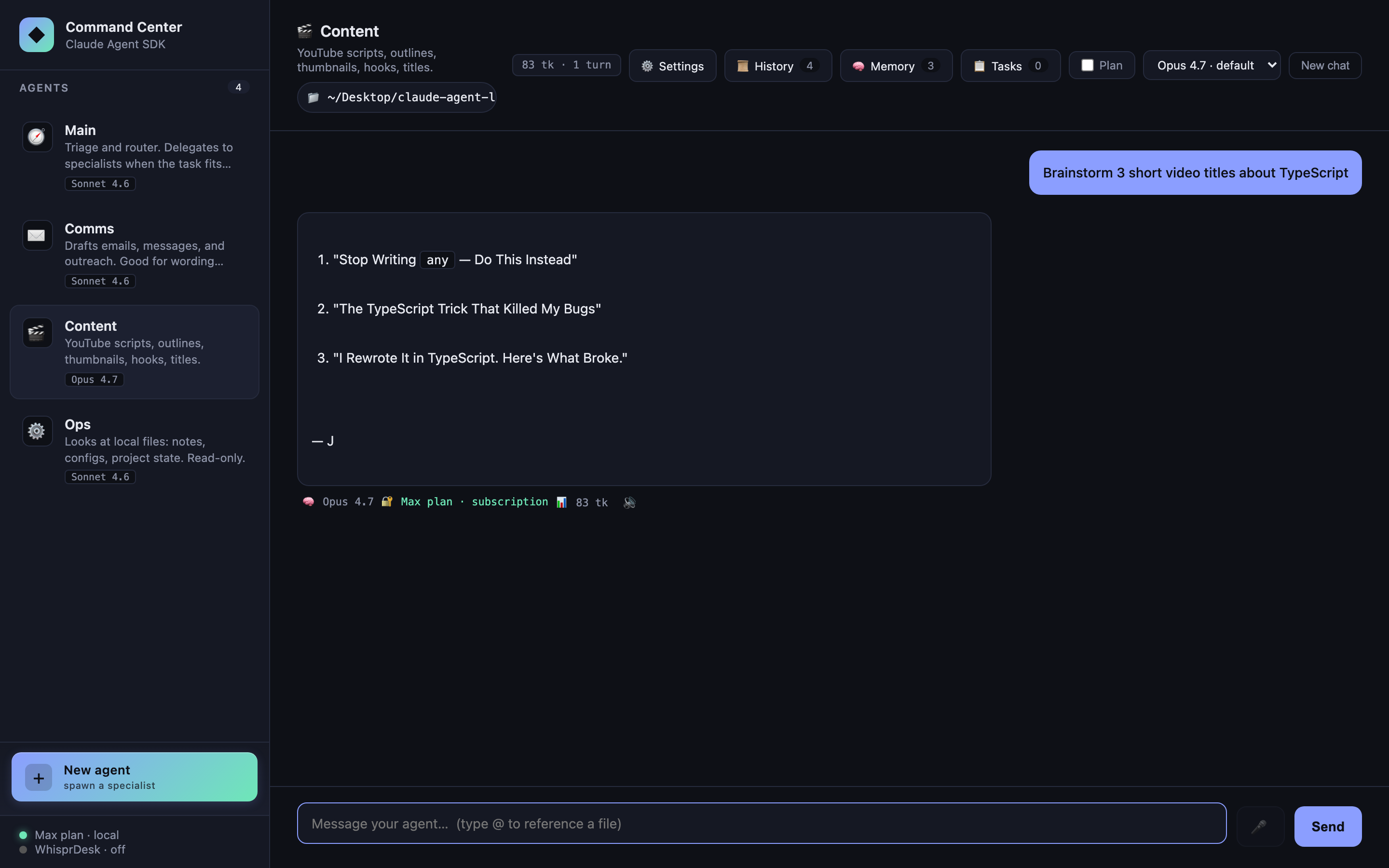
The SDK’s ResultMessage carries usage and total_cost_usd for every reply. We display:
- Per-message footer:
📊 850 tk(always) plus· $0.0042(only when an API key is paying —apiKeySourceisuser/org/project) - Session-totals chip in the header:
12.4K tk · 18 turnsplus· $0.0731(same OAuth-aware rule)
Why no $ for Max-plan / OAuth users: the Max plan is flat-rate, not per-token. Showing the SDK-calculated dollar number would imply per-message billing that doesn’t apply. Tokens still matter as a proxy for “how heavily am I using my plan?” — those stay visible to everyone. Hover the chip for an in / out / cache breakdown.
When you flip to API-key auth (or sell a derivative product where users supply their own key), the cost column lights up automatically — the UI keys off apiKeySource, no config flag needed.
Conversation export
/export          → Markdown download, agent name + ISO timestamp
/export md       → same
/export json     → JSON download with full usage objects intact
Implemented entirely client-side from the existing chat state — no server round-trip. The Markdown variant is publish-friendly: agent emoji header, exported-at timestamp, session totals chip, “You: …” / “Agent (model · tokens):” pattern, tool-use citations as blockquotes. JSON keeps the raw usage objects intact so the export can feed downstream analysis.
Filename pattern: {agent-name-slug}-{ISO-stamp}.{md|json}.
Slash commands
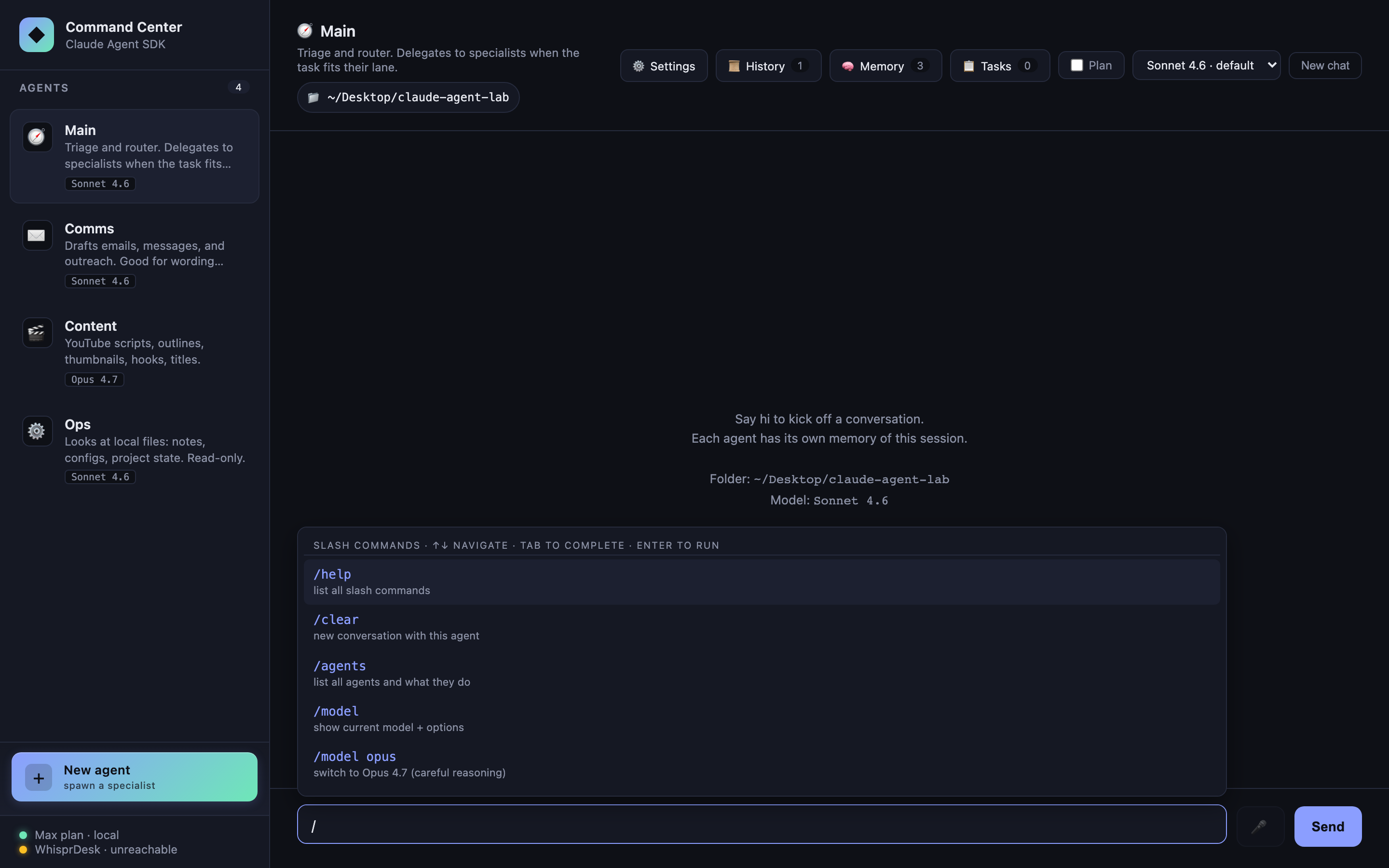
Type / and a live autocomplete popover appears above the composer — same interaction model as the @file popover. ↑↓ to navigate, Tab to complete, Enter to run, Escape to dismiss. Narrows as you type (/th → 3 /think variants).
| Command | Effect |
|---|---|
/help |
List all commands |
/clear |
New conversation with this agent |
/agents |
List all agents with their descriptions and default models |
/model |
Show current model + available options |
/model <id> |
Switch model for this agent. Aliases: opus, sonnet, haiku |
/think hard |
Ergonomic alias: switch to Opus 4.7 (careful reasoning) |
/think fast |
Alias: switch to Haiku 4.5 (snappy, cheap) |
/think default |
Reset to the agent’s configured default |
/plan on\|off |
Toggle plan mode for this agent |
/export |
Download this chat as Markdown |
/export json |
Download as JSON with full usage objects |
Output renders as a system-origin message in the chat log with full markdown formatting.
Plan mode toggle
A checkbox in the header flips the active agent into the SDK’s permissionMode: 'plan' — tool calls are classified as they’d run but not actually executed. Great for exploring what Ops would do before letting it do it. Also useful as a destructive-action safety net: enable plan on Content or Ops, ask the hard question, read the plan, then disable plan and rerun if the plan looks right.
Per-agent state. Switching plan mode clears that agent’s session (the SDK treats plan vs. execute as different context semantics).
Budget caps (CostGuard)
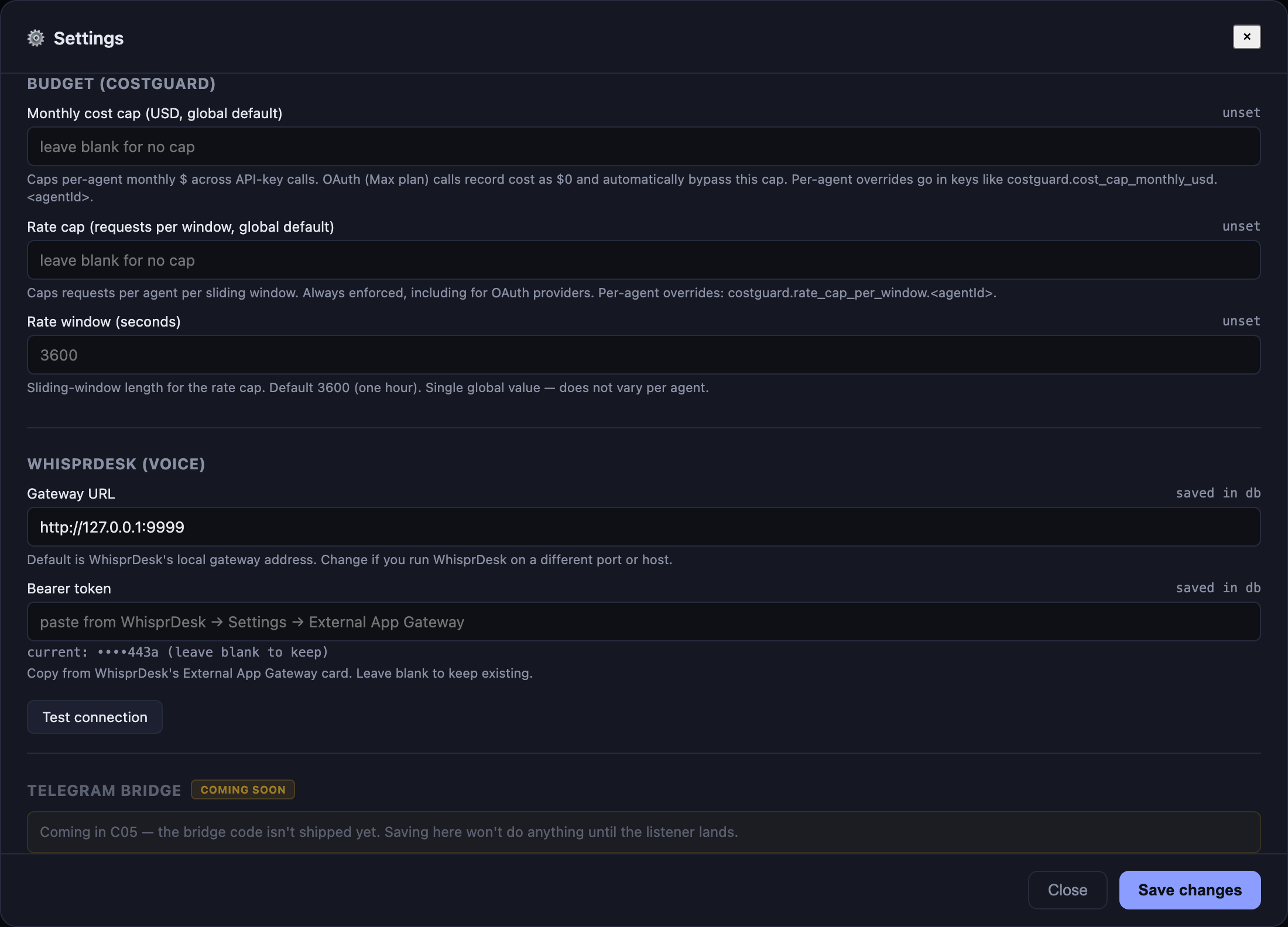
CostGuard is a preflight-and-record primitive that runs before every query() call: chat, streaming chat, and scheduled task fires all funnel through it. If the active agent is over its window-to-date budget, the request returns a structured 429-shaped response before a single SDK token is spent.
Two cap axes, both per-agent (with global defaults):
- Cost cap — monthly USD ceiling. OAuth providers bypass this — Max plan is flat-rate, so dollar accounting against a Max session is nonsense. API-key sessions enforce it.
- Rate cap — requests-per-window ceiling. Always enforced, regardless of provider, because rate-limit posture matters even when the cost is $0.
The signature was locked across two projects (Command Center + the multi-provider sister app Clawless) so the same src/costGuard.ts lifts mechanically into either codebase:
costGuard.check(agentId: string, estimatedTokens?: number): {
  ok: boolean;
  reason?: string;            // human-readable rejection text
  capType?: "cost" | "rate";  // which cap tripped
  remaining?: number;         // dollars (cost) or requests (rate)
}
Server-side enforcement only — no client influence on the verdict. Caps live in the same SQLite settings table as the rest of the operator config; configurable per-agent under “Budget (CostGuard)” in the Settings modal. A blank or 0 cap means “unset” — to genuinely pause an agent, set its rate cap to 1 (the first call exhausts it).
Every successful or failed call lands in a cost_ledger row with (agent_id, occurred_at, cost_usd, tokens_in, tokens_out, is_oauth). The is_oauth flag is the data-driven OAuth-bypass: cost SUMs filter rows where is_oauth=1, so bypass is automatic without env-var coupling.
sequenceDiagram
  autonumber
  participant UI
  participant Srv as /api/chat[/stream]
  participant CG as costGuard
  participant SDK as query()
  participant Ledger as cost_ledger (SQLite)

  UI->>Srv: POST {agentId, message}
  Srv->>CG: check(agentId)
  alt over cap
    CG-->>Srv: {ok:false, capType:"cost"|"rate", reason, remaining:0}
    Srv-->>UI: 429 — budget exhausted (no SDK call made)
  else under cap
    CG-->>Srv: {ok:true, remaining:N}
    Srv->>SDK: query({...})
    SDK-->>Srv: result + usage + apiKeySource
    Srv->>CG: record({agentId, costUsd, tokens, isOauth})
    CG->>Ledger: INSERT row
    Srv-->>UI: reply
  end
GET /api/costguard/status?agentId=X returns {rateUsed, rateRemaining, costUsedThisMonth, costRemaining} — useful for surfacing per-agent budget chips in the UI later. Hot-path overhead measured at ~7 µs p50 / ~15 µs p99, invisible against LLM latency.
Settings panel
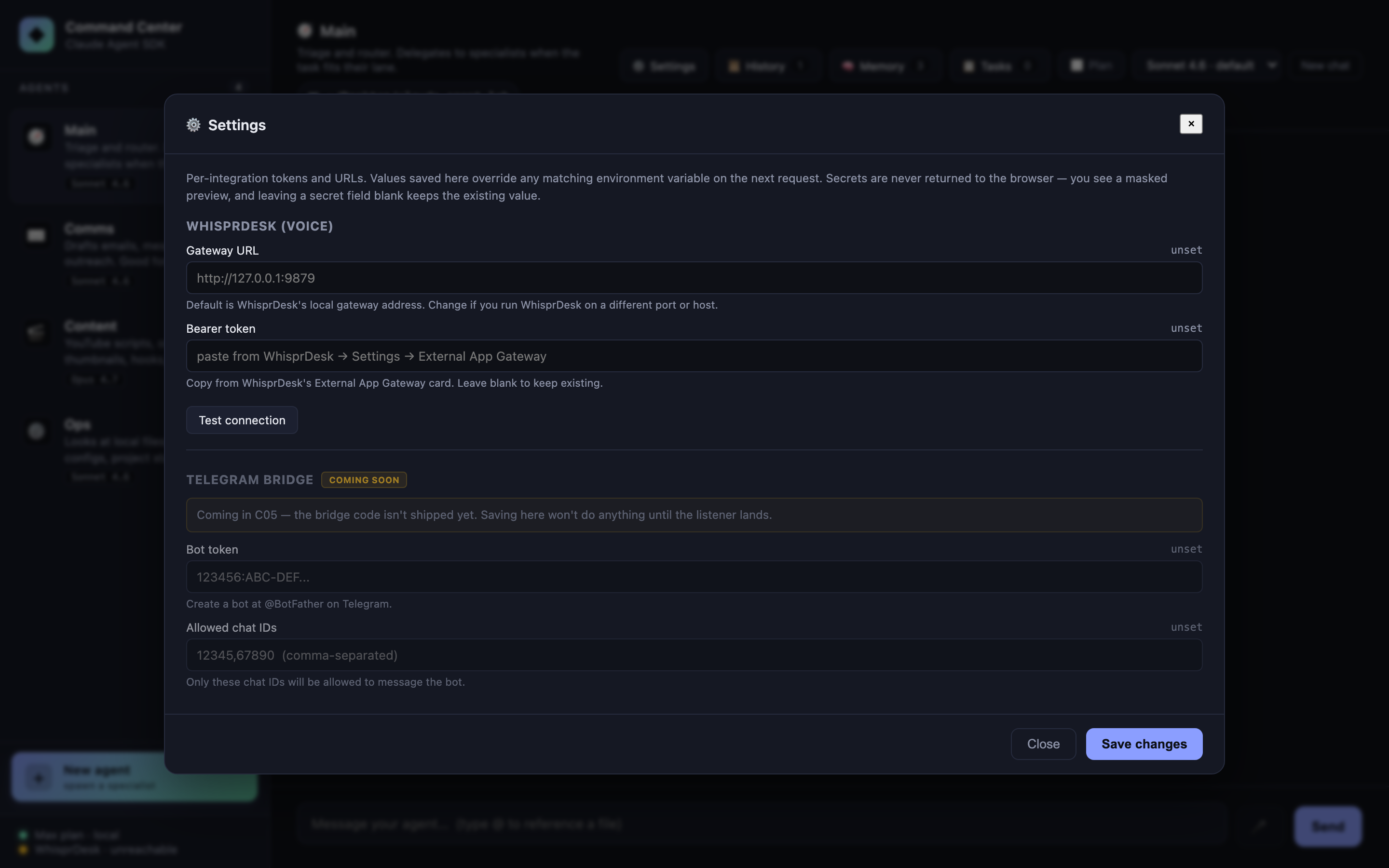
A ⚙️ Settings button in the header opens a modal backed by a SQLite settings table (key, value, is_secret, updated_at). Every integration surfaces here instead of being hidden behind .env edits. Current sections:
- WhisprDesk — Gateway URL + Bearer token + live Test connection button
- Budget (CostGuard) — cost cap (monthly USD) + rate cap (requests-per-window) + window length. Global defaults plus per-agent overrides. See Budget caps.
- Telegram bridge (coming soon) — the fields render with a disabled state and a “coming soon” badge until the C05 bridge ships; saving is deliberately blocked so no one gets the broken-promise experience
Secrets never round-trip to the browser: the UI shows a masked preview (••••c123), leaving a secret field blank keeps the existing value, and the raw token stays server-side for every proxied request. Values saved in the DB override matching env vars automatically — you can still paste tokens into .env for headless deploys.
Voice in / out via WhisprDesk
If you have WhisprDesk running locally, Command Center integrates with it in three ways out of the box:
Active mode (mic button or ⌥V): A 🎤 button next to Send — or the keyboard shortcut ⌥V (Option+V on macOS, Alt+V elsewhere) — records audio via MediaRecorder. Click again / press ⌥V again to stop. The WebM/Opus audio is decoded in the browser via the Web Audio API, re-encoded as mono 16-bit PCM WAV (so server-side ffmpeg decoders always succeed on the output regardless of MediaRecorder quirks), then POSTs to /api/whisprdesk/transcribe. Server adds the Bearer header; transcript drops into the composer, ready to edit or send with Enter. A live pink banner above the composer shows the elapsed recording time and the stop instruction.
Passive mode (SSE listener): The server subscribes to WhisprDesk’s /v1/events stream. Any dictation you do anywhere on your Mac via WhisprDesk’s native push-to-talk shortcut — as long as Command Center is the focused tab — auto-fills the composer. You keep the muscle memory; the lab just steals the transcript.
Voice out: Each agent reply gets a 🔊 button that uses the browser’s built-in SpeechSynthesis API to read the reply aloud. Click again to stop.
Setup. Open ⚙️ Settings → WhisprDesk section → paste the Bearer token from WhisprDesk’s External App Gateway card → Save. The sidebar footer flips from WhisprDesk · off to · ready within a second. The 🎤 button enables. No restart needed.
🎙 Don’t have WhisprDesk yet?
WhisprDesk is a local-first macOS dictation app built on the same open-source Whisper engine OpenAI released. It runs entirely on your Mac — audio never leaves the machine — and gives you a system-wide push-to-talk shortcut that works in any text field across any app.
- 🔒 Local-only — no cloud, no accounts, no telemetry
- ⚡ Real-time — transcription lands as you speak
- 🧩 Open gateway — the same External App Gateway Command Center uses, so any app you write can plug in
- 💲 One-time $29 — no subscription, no seat pricing, lifetime updates
→ Grab it at whisprdesk.com
Disclosure: WhisprDesk is by the same author as this lab. Full disclosure and worth saying explicitly: the integration in this README works with any future Whisper-exposing HTTP gateway that matches the shape — it’s not proprietary lock-in. WhisprDesk is just the cleanest shipped one I know of.
Abort on client disconnect
If you reload the browser mid-reply, the server aborts the query() via AbortController instead of letting the SDK keep streaming into a dead socket. The trick is listening on res.on("close") — not req.on("close"), which fires as soon as express.json() finishes consuming the request body. Documented in docs/case-studies/building-with-ai-agents.md because it’s a subtle gotcha.
Multi-turn per agent
Each agent has its own sessionId captured from the SDK’s system.init message. Subsequent messages pass resume: sessionId, giving the SDK the full prior conversation. Hit the New chat button to drop that session and start fresh.
Quick start
git clone https://github.com/jaysidd/claude-agent-lab.git
cd claude-agent-lab
npm install

# Option A — API key (recommended; works as a daily driver)
cp .env.example .env
# edit .env and paste your key from https://console.anthropic.com/settings/keys

# Option B — your local Claude Code CLI login (personal tinkering only)
# Nothing to configure; just ensure `claude` is installed and logged in.
# See Authentication section for the ToS caveat.

npm run serve
Then open http://localhost:3333. The server binds to 127.0.0.1 only — it does not listen on your LAN.
One-click launcher (macOS)
The repo ships a .command file that, when double-clicked, kills any previous server on :3333, runs npm install if needed, starts the server, waits for readiness, and opens the browser. Copy it to your Desktop for a double-clickable launcher:
cp scripts/launch-command-center.command "$HOME/Desktop/Command Center.command"
chmod +x "$HOME/Desktop/Command Center.command"
First double-click: macOS Gatekeeper may block an unsigned script. Right-click the icon → Open → confirm once; after that it launches without prompts. The script respects a COMMAND_CENTER_DIR env var if your clone lives somewhere other than ~/Desktop/claude-agent-lab.
Want a custom icon? Right-click the file on Desktop → Get Info → drag a PNG onto the tiny icon in the top-left of the Info window.
Requirements
- Node.js 20+ (tested on 24.14.1)
- One of:
- An Anthropic API key from console.anthropic.com
- A logged-in Claude Code CLI (
claudebinary) — for personal use on your own machine
Architecture
System topology
Browser (vanilla JS)  →  Express server (:3333)  →  Claude Agent SDK  →  Claude Code CLI
      │                        │                          │                    │
      │                 /api/* routes                query({...})        OAuth session
      │                        │                          │                (or API key)
      │                 in-memory state              Anthropic
      │                 (sessions, cwd,
      │                  tasks, overrides)
One process, one port. No Electron, no IPC bridge, no separate renderer build. tsx runs TypeScript directly. Static files serve from /public.
State lives in two layers: SQLite at data/lab.db (persistent across restarts) for everything that should survive a reboot, plus a small in-memory layer for per-process session pointers. The DB is gitignored — nothing leaves your laptop.
| Where | Name | Purpose |
|---|---|---|
| In-memory | sessionByAgent: Map<agentId, sessionId> |
SDK session id for resume: (cleared on reset, cwd change, model override) |
| In-memory | modelOverride: Map<agentId, string> |
Per-agent model override vs agents.ts default |
| In-memory | currentCwd: string |
Folder passed as cwd to every query() |
| SQLite | tasks |
Durable task queue — atomic checkout, leases, retries (see Durable task queue) |
| SQLite | cost_ledger |
Per-call usage rows — backs CostGuard’s cost + rate windows (see Budget caps) |
| SQLite | sessions + session_messages |
Conversation history; restore via resume: (see Session history) |
| SQLite | memories |
Persistent memory injected into the system prompt |
| SQLite | settings |
Operator config (WhisprDesk creds, budget caps, etc.) — overrides env vars |
| SQLite | custom_agents |
User-spawned agents merged with built-ins via the agent registry |
Full design notes in architecture.md.
Technical details
Authentication resolution
The SDK picks credentials in strict order. First match wins.
flowchart TD
  Start([Start]) --> CheckEnv{ANTHROPIC_API_KEY set?}
  CheckEnv -->|yes| UseKey["Use API key<br/>apiKeySource = 'user' / 'org' / 'project'"]
  CheckEnv -->|no| CheckCloud{CLAUDE_CODE_USE_BEDROCK /<br/>_USE_VERTEX / _USE_FOUNDRY ?}
  CheckCloud -->|yes| UseCloud["Use cloud transport<br/>with provider credentials"]
  CheckCloud -->|no| CheckCLI{claude CLI<br/>logged in at ~/.claude?}
  CheckCLI -->|yes| UseOAuth["Use OAuth session<br/>apiKeySource = 'none'"]
  CheckCLI -->|no| Error([Error: no credentials])

  UseKey:::ok
  UseCloud:::ok
  UseOAuth:::ok

  classDef ok fill:#6ee7b7,color:#0e1016,stroke:#6ee7b7
In this repo: ANTHROPIC_API_KEY empty by default → OAuth path → apiKeySource === "none" on the response → UI labels it “🔐 Max plan · subscription”.
Simple chat request (buffered, /api/chat)
Used by the non-streaming fallback and the Playwright test suite.
sequenceDiagram
  autonumber
  participant UI as Browser app.js
  participant Srv as Express /api/chat
  participant SDK as Agent SDK query()
  participant CLI as claude subprocess
  participant API as Anthropic API

  UI->>Srv: POST {agentId, message}
  Srv->>Srv: agent = AGENTS[agentId]<br/>resume = sessionByAgent[agentId]<br/>model = effectiveModel(agentId)
  Srv->>SDK: query({prompt, options: {...}})
  SDK->>CLI: spawn claude, pipe JSON-RPC
  CLI->>API: HTTPS (OAuth or API key)
  API-->>CLI: streaming response
  CLI-->>SDK: SDK messages (async iterator)
  loop for each message
    SDK-->>Srv: SystemMessage / AssistantMessage / ResultMessage
    alt system.init
      Srv->>Srv: capture session_id + model + apiKeySource
    else assistant with tool_use
      Srv->>Srv: push to toolUses[]
    else result
      Srv->>Srv: finalText = msg.result
    end
  end
  Srv->>Srv: sessionByAgent[agentId] = new session_id
  Srv-->>UI: {reply, toolUses, model, apiKeySource, cwd}
Streaming chat (/api/chat/stream)
With includePartialMessages: true, the SDK emits SDKPartialAssistantMessage events (type: "stream_event") that wrap Anthropic’s raw BetaRawMessageStreamEvent. The server unwraps content_block_delta events and forwards text deltas as NDJSON.
sequenceDiagram
  autonumber
  participant UI as app.js
  participant Srv as /api/chat/stream
  participant SDK as query()
  Note over UI,Srv: POST body: {agentId, message}
  UI->>Srv: fetch()
  Srv-->>UI: headers sent,<br/>Content-Type: application/x-ndjson
  Srv->>SDK: query({includePartialMessages: true, abortController, ...})
  loop SDK message stream
    SDK-->>Srv: system.init
    Srv-->>UI: {"kind":"init","sessionId","model","apiKeySource"}
    SDK-->>Srv: stream_event (content_block_delta)
    Srv-->>UI: {"kind":"text_delta","text":"..."}
    SDK-->>Srv: assistant (tool_use block)
    Srv-->>UI: {"kind":"tool_use","name","input"}
    SDK-->>Srv: result
    Srv-->>UI: {"kind":"result","text":"..."}
  end
  Srv-->>UI: {"kind":"done"}
  Note over UI,Srv: server ends the response and the socket closes normally
  Note over UI,Srv: If the client disconnects mid-stream<br/>the res close event triggers abortController.abort<br/>which stops the SDK iterator
Wire shape (real sample):
{"kind":"init","sessionId":"3cf37180-...","model":"claude-opus-4-7","apiKeySource":"none"}
{"kind":"text_delta","text":"Here are 3 You"}
{"kind":"text_delta","text":"Tube title ideas:\n\n1. I Built an AI Agent in "}
{"kind":"text_delta","text":"10 Minutes\n2. Claude Agent SDK: The Missing Begin"}
{"kind":"text_delta","text":"ner's Guide\n3. Why Developers Are Switching..."}
{"kind":"result","text":"Here are 3 YouTube title ideas:\n\n1. ..."}
{"kind":"done"}
Sub-agent delegation (Main → Comms/Content/Ops)
sequenceDiagram
  autonumber
  participant User
  participant Main as Main agent<br/>(allowedTools: ["Agent"])
  participant SDK as SDK tool loop
  participant Comms as Comms sub-agent<br/>(allowedTools: ["WebFetch"])

  User->>Main: "Draft an email declining a podcast invite"
  Main->>Main: System prompt: delegate when in a specialist's lane
  Main->>SDK: tool_use {name:"Agent",<br/>input:{subagent_type:"comms",<br/>prompt:"Draft an email..."}}
  SDK->>Comms: runs sub-agent with<br/>its own systemPrompt + tools + model
  Comms-->>SDK: returns draft text
  SDK-->>Main: tool_result containing draft
  Main->>Main: Summarize / pass-through
  Main-->>User: final reply (UI shows<br/>"🤝 delegated to ✉️ Comms" chip)
Key property: sub-agents run with their own allowedTools, not the router’s. Delegation cannot escalate tool access — Main’s empty-tool-set doesn’t leak into Comms, and Comms’s WebFetch doesn’t leak out to Main.
Task queue + classification flow
sequenceDiagram
  autonumber
  participant UI
  participant TaskAPI as /api/task
  participant Classifier as Haiku query()<br/>(no tools, systemPrompt = classify)
  participant RunAPI as /api/task/:id/run
  participant Agent as Assigned agent's query()

  UI->>TaskAPI: POST {description, priority}
  alt agentOverride provided
    TaskAPI->>TaskAPI: assignedAgent = override
  else
    TaskAPI->>Classifier: "Task: ..." with system prompt<br/>"respond with ONE word: main|comms|content|ops"
    Classifier-->>TaskAPI: "comms"
    TaskAPI->>TaskAPI: validate against AGENTS keys<br/>fallback to "main"
  end
  TaskAPI->>TaskAPI: tasks[id] = {status:"queued", assignedAgent}
  TaskAPI->>TaskAPI: pruneCompletedTasks(cap:50)
  TaskAPI-->>UI: Task card in Queued column

  Note over UI,Agent: --- later, user clicks Run ---
  UI->>RunAPI: POST /api/task/:id/run
  RunAPI->>RunAPI: status = "active", startedAt = now
  RunAPI->>Agent: query() with agent's config,<br/>NO resume (fresh context)
  Agent-->>RunAPI: final result text
  RunAPI->>RunAPI: status = "done", result, completedAt
  RunAPI-->>UI: updated task
Task state machine (durable queue)
stateDiagram-v2
  [*] --> queued: enqueue
  queued --> checked_out: atomic checkout
  checked_out --> done: complete
  checked_out --> failed: fail — no retries left
  checked_out --> queued: fail with retry OR reapExpired
  queued --> cancelled: cancel
  checked_out --> cancelled: cancel
  done --> [*]: DELETE or prune
  failed --> [*]: DELETE
  cancelled --> [*]: DELETE

  note right of queued
    priority, agent_id
    attempts, max_attempts
    metadata_json up to 64 KB
    scheduled_for
  end note

  note right of checked_out
    + worker_id
    + leased_until
    + started_at
  end note

  note right of done
    + completed_at, result_text
  end note
The 5-state enum is the wire shape across both Command Center and Clawless’s task queue (B54). The running state from C03’s in-memory version was dropped — it was a worker-side concern, not queue-side. failed is reachable only after attempts ≥ max_attempts; otherwise fail() loops back to queued.
Frontend data flow (streaming path)
flowchart LR
  subgraph client [Browser state]
    S[state.conversations<br/>agentId → messages]
  end

  U[User types + Enter] --> Submit{composer<br/>submit}
  Submit --> Push[push user msg] --> Render1[renderMessages]
  Submit --> Stub[push empty agent bubble<br/>streaming:true] --> Render2[renderMessages]
  Render2 --> Cache[cache body DOM ref]

  Cache --> Fetch["fetch /api/chat/stream<br/>body.getReader()"]
  Fetch --> Loop{read chunk}
  Loop -->|text_delta| Direct[body.textContent = text<br/>no re-render]
  Loop -->|tool_use<br/>init<br/>result<br/>error| Full[renderMessages]
  Loop -->|done| Done[streaming:false,<br/>final renderMessages]

  Direct --> Loop
  Full --> Loop
  Done --> End([done])

  style Direct fill:#6ee7b7,color:#0e1016
  style Cache fill:#8b9eff,color:#0e1016
Why the direct-write optimization matters: renderMessages() rebuilds the entire chat log on each call. For a 2000-token Sonnet reply streamed as ~200 deltas, re-rendering per delta was O(turns × deltas) main-thread work (~2–5 ms per delta, compounding). By caching the streaming bubble’s body element and mutating textContent directly, per-delta cost drops to sub-millisecond. Performance audit details.
Security-relevant defaults
- Binds to
127.0.0.1— never0.0.0.0. LAN neighbors cannot reach the server. Override withHOST=...only if you know what you’re doing. - All user-controlled strings go through
textContent— noinnerHTMLinterpolation anywhere inpublic/app.js. - Classifier output is whitelisted against known agent ids before use; never string-interpolated into tool arguments.
- Sub-agent delegation cannot escalate tool access — each sub-agent runs with its own
allowedTools. - Path traversal on
/api/cwd//api/browseis intentionally unrestricted for the personal-use threat profile (user can reach anywhere on their own laptop anyway). This becomes a BLOCKER the moment a multi-user or commercial path is introduced — see the security audit.
API contract
| Route | Method | Request | Response |
|---|---|---|---|
/api/agents |
GET | — | Array<{id, name, emoji, accent, description, model, defaultModel}> |
/api/models |
GET | — | Array<{id, label, blurb}> |
/api/model/:agentId |
POST | {model?: string} |
{agentId, model} (empty body = reset) |
/api/cwd |
GET | — | {cwd, home} |
/api/cwd |
POST | {path} |
{cwd} |
/api/browse |
GET | ?path=... |
{path, parent, dirs[]} |
/api/files |
GET | ?q=... |
{files: Array<{name, isDir}>} |
/api/chat |
POST | {agentId, message} |
{reply, toolUses, cwd, model, apiKeySource} |
/api/chat/stream |
POST | {agentId, message} |
NDJSON (see wire shape above) |
/api/reset/:agentId |
POST | — | {ok} |
/api/memories |
GET | ?agentId= |
Array<Memory> (global + matching agent if provided) |
/api/memories |
POST | {content, agentId?, category?} |
Memory |
/api/memories/:id |
DELETE | — | {ok} |
/api/plan/:agentId |
POST | {enabled: boolean} |
{agentId, enabled} |
/api/tasks |
GET | — | Array<Task> (durable, SQLite-backed) |
/api/task |
POST | {description, priority?, agentId?} |
Task |
/api/task/:id/run |
POST | — | Task (atomic checkout, then runs) |
/api/task/:id |
DELETE | — | {ok} (terminal-state only; non-terminal returns 409) |
/api/costguard/status |
GET | ?agentId= |
{rateUsed, rateRemaining, costUsedThisMonth, costRemaining} |
/api/settings |
GET | — | {schema, values, envFallbacks} (secrets masked) |
/api/settings |
POST | {entries: [{key, value, isSecret}]} |
{ok, changed} |
/api/agents (POST) |
POST | {name, emoji, accent, description, systemPrompt, model, allowedTools, isRouter?} |
New custom agent |
/api/agents/:id |
GET | — | Single agent (built-in or custom) |
/api/agents/:id |
PATCH | partial update | Custom only — built-ins return 400 |
/api/agents/:id |
DELETE | — | Custom only — built-ins return 400 |
/api/whisprdesk/status |
GET | — | {configured, reachable?, upstream?, error?} |
/api/whisprdesk/capabilities |
GET | — | WhisprDesk’s /v1/capabilities proxied |
/api/whisprdesk/transcribe |
POST | raw audio body (≤30 MB) | {text, provider, model, durationMs} |
/api/whisprdesk/events |
GET | — | SSE passthrough from WhisprDesk |
/api/sessions |
GET | ?agentId= |
Array<Session> — past conversations |
/api/sessions/:id |
GET | — | {session, messages} |
/api/sessions/:id/restore |
POST | — | Sets server-side session for that agent + returns messages |
/api/sessions/:id/title |
POST | {title} |
Rename |
/api/sessions/:id |
DELETE | — | {ok} (cascade-deletes messages) |
Project layout
claude-agent-lab/
├── src/
│   ├── server.ts             # Express + SDK glue (~1,080 LOC). All /api/* routes.
│   ├── agents.ts             # Four built-in agent configs + sub-agent helper
│   ├── agentRegistry.ts      # Merges built-ins with SQLite-backed custom agents
│   ├── customAgents.ts       # CRUD for user-spawned agents
│   ├── memory.ts             # Persistent memory: CRUD + system-prompt injection
│   ├── sessions.ts           # Conversation history: persist + resume
│   ├── settings.ts           # Operator config (Settings modal backing)
│   ├── taskQueue.ts          # Durable queue primitive (host-agnostic, ~575 LOC)
│   ├── taskQueueInstance.ts  # Singleton bootstrap with worker fingerprint
│   ├── costGuard.ts          # Budget preflight primitive (host-agnostic, ~190 LOC)
│   ├── costGuardInstance.ts  # Singleton bootstrap reading caps from settings
│   └── hello.ts              # 15-line URL-summarizer smoke test
├── public/
│   ├── index.html            # UI markup
│   ├── style.css             # Dark command-center theme
│   └── app.js                # Vanilla-JS frontend (~2,450 LOC) — no framework
├── data/
│   └── lab.db                # SQLite — gitignored, on-disk only
├── tests/
│   ├── smoke.spec.ts         # 7 baseline offline Playwright tests
│   ├── features.spec.ts      # 26 feature-level tests (queue, CostGuard, etc.)
│   └── chat.spec.ts          # 2 @engine tests that hit the real SDK
├── docs/
│   ├── case-studies/         # What-we-learned-while-building notes
│   ├── audits/               # Per-feature Performance + Security audit reports
│   └── screenshots/          # The images used in this README
├── scripts/
│   ├── launch-command-center.command  # Double-clickable macOS launcher
│   └── screenshot.mjs        # Playwright script that captures README images
├── CLAUDE.md                 # Project conventions (six-role dev team, etc.)
├── architecture.md           # Technical architecture
├── backlog.md                # Sequential feature backlog (C##)
└── (.notes/                  # Private, gitignored — handoffs & draft posts)
Scripts
npm run serve        # start the server (also `npm start`)
npm run hello        # original URL-summarizer smoke test
npm run test:smoke   # 33 offline tests (no SDK calls, ~5 seconds)
npm run test:engine  # 2 end-to-end tests against the real SDK (~15 seconds)
npm test             # all tests (35 total)

node scripts/screenshot.mjs   # regenerate the README screenshots (needs server running)
Authentication
The Agent SDK resolves credentials in this order:
ANTHROPIC_API_KEYenv var — if set, used unconditionally- Enterprise transports —
CLAUDE_CODE_USE_BEDROCK=1,CLAUDE_CODE_USE_VERTEX=1, orCLAUDE_CODE_USE_FOUNDRY=1with the corresponding cloud credentials - Your local Claude Code CLI’s OAuth session — only if none of the above are set
If you’re using this lab for your own personal learning on your own laptop and already have Claude Code installed, option 3 works automatically. The SDK inherits your CLI session the same way claude itself does.
If you’re reading this to understand what to do for a shippable product: do not use option 3. Anthropic’s Agent SDK docs are explicit:
Unless previously approved, Anthropic does not allow third party developers to offer claude.ai login or rate limits for their products, including agents built on the Claude Agent SDK. Please use the API key authentication methods described in this document instead.
This repo is not a product. If you turn it into one, switch to API keys and surface a BYO-key UI for your users.
What’s on the backlog
The current implementation covers F1–F7 foundation, C01–C15 (streaming, delegation, tasks, markdown, memory, slash commands, plan mode, WhisprDesk, Settings, custom agents), A1–A3 (cost tracking, session history, conversation export), and the first two sub-features of the C16 “Autonomous Agent Firm” epic: durable task queue (C16b) and budget caps (C16c). See backlog.md for the full sequential list.
Active epic — C16: Autonomous Agent Firm (Phase 2: agents that run while you sleep)
| Sub-feature | Status |
|---|---|
| C16b Durable task queue | ✅ Shipped — atomic checkout, lease recovery, host-agnostic primitive |
| C16c CostGuard budget caps | ✅ Shipped — preflight check() with cost + rate axes, OAuth-aware |
| C16a Scheduler | ⭐ Next — cron-style triggers; wires taskQueue.checkout() into a tick loop, OAuth-rotation healthcheck |
| C16d Per-task approval gates | Pending — requires_approval per task, pause-and-wait at PreToolUse hook |
Smaller items on the bench
- C05 Telegram bridge — Settings fields already live (disabled pending code). Need long-poll listener, chat-id allowlist, agent-routing.
- C12 File rewind UI — needs streaming-input refactor so the SDK
Queryobject stays alive across requests andQuery.rewindFiles(userMessageId)can fire from a button. - AskUserQuestion inline UI — surface the SDK’s built-in mid-turn clarification tool as an interactive card.
- MCP configuration UI — point at an external MCP server and have its tools light up for a chosen agent.
- Keyboard shortcuts hub — Cmd+K agent switcher, Cmd+T tasks, Cmd+; settings.
- Context pinning per agent — pin a file or snippet that auto-prepends to every turn for that agent.
Further-out ideas (full list in backlog.md → “Future — not scheduled”): “council mode” multi-agent debate + synthesizer, multi-pane chat, hook inspector timeline, Skills panel, multiple workspaces, onboarding tour.
What this is not
- Not a product. No service, no accounts, no billing, no hosted version.
- Not multi-provider. Claude only. For OpenAI / Ollama / OpenRouter / local models, the natural next step is Clawless — a commercial desktop app from the same author with full multi-provider support. Coming soon.
- Not for anyone else’s Max plan. If you want to build a Max-plan-powered app for other people, you can’t — see Authentication.
Contributing
Issues and PRs welcome if you’re using this as a learning reference and want to contribute improvements.
That said: this project deliberately stays small. Features that require new runtime dependencies, a framework, or a multi-provider abstraction will likely be declined with a “this belongs in a different project” note. The point is to be readable end-to-end in an afternoon.
The six-role dev-team convention the repo uses (Architect → Developer → Reviewer → QA → Performance Analyst → Security Analyst) is documented in CLAUDE.md. You don’t need to follow it to contribute, but PRs that include a brief “Reviewer checklist” in the description tend to merge faster.
Acknowledgements
- Anthropic for the Claude Agent SDK and for making
@anthropic-ai/claude-agent-sdkopen and approachable. - WhisprDesk — the one-time-$29 local Whisper dictation app that Command Center’s voice layer integrates with. Audio stays on your Mac; the gateway pattern means any app on your machine can share the STT pipeline.
- The YouTuber who demonstrated a command-center pattern on top of OpenClaw and got me thinking about how thin this layer could actually be when Claude is the target model.
- Clawless — my own desktop app with full multi-provider AI support, the natural next step if you outgrow this lab’s Claude-only scope. Coming soon.
License
MIT — use it, fork it, study it, teach from it. If you ship a commercial derivative, remember the Authentication caveat above.